mirror of
https://github.com/qaiu/netdisk-fast-download.git
synced 2025-12-16 12:23:03 +00:00
 b5628eac17
# Conflicts:
#	parser/src/test/java/cn/qaiu/parser/clientlink/impl/CurlLinkGeneratorTest.java
457 lines
16 KiB
Markdown
457 lines
16 KiB
Markdown
<p align="center">
|
||
<img src="https://github.com/user-attachments/assets/87401aae-b0b6-4ffb-bbeb-44756404d26f" alt="项目预览图" />
|
||
</p>
|
||
|
||
<p align="center">
|
||
<a href="https://github.com/qaiu/netdisk-fast-download/actions/workflows/maven.yml"><img src="https://img.shields.io/github/actions/workflow/status/qaiu/netdisk-fast-download/maven.yml?branch=v0.1.9b8a&style=flat"></a>
|
||
<a href="https://www.oracle.com/cn/java/technologies/downloads"><img src="https://img.shields.io/badge/jdk-%3E%3D17-blue"></a>
|
||
<a href="https://vertx-china.github.io"><img src="https://img.shields.io/badge/vert.x-4.5.6-blue?style=flat"></a>
|
||
<a href="https://raw.githubusercontent.com/qaiu/netdisk-fast-download/master/LICENSE"><img src="https://img.shields.io/github/license/qaiu/netdisk-fast-download?style=flat"></a>
|
||
<a href="https://github.com/qaiu/netdisk-fast-download/releases/"><img src="https://img.shields.io/github/v/release/qaiu/netdisk-fast-download?style=flat"></a>
|
||
</p>
|
||
|
||
|
||
|
||
|
||
# netdisk-fast-download 网盘分享链接云解析服务
|
||
QQ群:1017480890
|
||
|
||
netdisk-fast-download网盘直链云解析(nfd云解析)能把网盘分享下载链接转化为直链,支持多款云盘,已支持蓝奏云/蓝奏云优享/奶牛快传/移动云云空间/小飞机盘/亿方云/123云盘/Cloudreve等,支持加密分享,以及部分网盘文件夹分享。
|
||
|
||
## 快速开始
|
||
命令行下载分享文件:
|
||
```shell
|
||
curl -LOJ "https://lz.qaiu.top/parser?url=https://share.feijipan.com/s/nQOaNRPW&pwd=1234"
|
||
```
|
||
或者使用wget:
|
||
```shell
|
||
wget -O bilibili.mp4 "https://lz.qaiu.top/parser?url=https://share.feijipan.com/s/nQOaNRPW&pwd=1234"
|
||
```
|
||
或者使用浏览器[直接访问](https://nfd-parser.github.io/nfd-preview/preview.html?src=https%3A%2F%2Flz.qaiu.top%2Fparser%3Furl%3Dhttps%3A%2F%2Fshare.feijipan.com%2Fs%2FnQOaNRPW&name=bilibili.mp4&ext=mp4):
|
||
```
|
||
### 调用演示站下载:
|
||
https://lz.qaiu.top/parser?url=https://share.feijipan.com/s/nQOaNRPW&pwd=1234
|
||
### 调用演示站预览:
|
||
https://nfd-parser.github.io/nfd-preview/preview.html?src=https%3A%2F%2Flz.qaiu.top%2Fparser%3Furl%3Dhttps%3A%2F%2Fshare.feijipan.com%2Fs%2FnQOaNRPW&name=bilibili.mp4&ext=mp4
|
||
|
||
```
|
||
|
||
**解析器模块文档:** [parser/README.md](parser/README.md)
|
||
|
||
## 预览地址
|
||
[预览地址1](https://lz.qaiu.top)
|
||
[预览地址2](http://www.722shop.top:6401)
|
||
[天翼云盘大文件解析限时开放](https://189.qaiu.top)
|
||
|
||
main分支依赖JDK17, 提供了JDK11分支[main-jdk11](https://github.com/qaiu/netdisk-fast-download/tree/main-jdk11)
|
||
**0.1.8及以上版本json接口格式有调整 参考json返回数据格式示例**
|
||
**小飞机解析有IP限制,多数云服务商的大陆IP会被拦截(可以自行配置代理),和本程序无关**
|
||
**注意: 请不要过度依赖lz.qaiu.top预览地址服务,建议本地搭建或者云服务器自行搭建。解析次数过多IP会被部分网盘厂商限制,不推荐做公共解析。**
|
||
|
||
## 网盘支持情况:
|
||
> 20230905 奶牛云直链做了防盗链,需加入请求头:Referer: https://cowtransfer.com/
|
||
> 20230824 123云盘解析大文件(>100MB)失效,需要登录
|
||
> 20230722 UC网盘解析失效,需要登录
|
||
|
||
网盘名称-网盘标识:
|
||
|
||
- [蓝奏云-lz](https://pc.woozooo.com/)
|
||
- [蓝奏云优享-iz](https://www.ilanzou.com/)
|
||
- ~[奶牛快传-cow(即将停服)](https://cowtransfer.com/)~
|
||
- [移动云云空间-ec](https://www.ecpan.cn/web)
|
||
- [小飞机网盘-fj](https://www.feijipan.com/)
|
||
- [亿方云-fc](https://www.fangcloud.com/)
|
||
- [123云盘-ye](https://www.123pan.com/)
|
||
- ~[115网盘(失效)-p115](https://115.com/)~
|
||
- ~[118网盘(已停服)-p118](https://www.118pan.com/)~
|
||
- [文叔叔-ws](https://www.wenshushu.cn/)
|
||
- [联想乐云-le](https://lecloud.lenovo.com/)
|
||
- [QQ邮箱云盘-qqw](https://mail.qq.com/)
|
||
- [QQ闪传-qqsc](https://nutty.qq.com/nutty/ssr/26797.html)
|
||
- [城通网盘-ct](https://www.ctfile.com)
|
||
- [网易云音乐分享链接-mnes](https://music.163.com)
|
||
- [酷狗音乐分享链接-mkgs](https://www.kugou.com)
|
||
- [酷我音乐分享链接-mkws](https://kuwo.cn)
|
||
- [QQ音乐分享链接-mqqs](https://y.qq.com)
|
||
- 咪咕音乐分享链接(开发中)
|
||
- [Cloudreve自建网盘-ce](https://github.com/cloudreve/Cloudreve)
|
||
- ~[微雨云存储-pvvy](https://www.vyuyun.com/)~
|
||
- [超星云盘(需要referer: https://pan-yz.chaoxing.com)-pcx](https://pan-yz.chaoxing.com)
|
||
- [WPS云文档-pwps](https://www.kdocs.cn/)
|
||
- Google云盘-pgd
|
||
- Onedrive-pod
|
||
- Dropbox-pdp
|
||
- iCloud-pic
|
||
### 仅专属版提供
|
||
- [移动云盘-p139](https://yun.139.com/)
|
||
- [联通云盘-pwo](https://pan.wo.cn/)
|
||
- [天翼云盘-p189](https://cloud.189.cn/)
|
||
|
||
## API接口
|
||
|
||
### 服务端口
|
||
- **6400**: API 服务端口(建议使用 Nginx 代理)
|
||
- **6401**: 内置 Web 解析工具(个人使用可直接开放此端口)
|
||
|
||
### 接口说明
|
||
|
||
#### 1. 302 自动跳转下载
|
||
|
||
**通用接口**
|
||
```
|
||
GET /parser?url={分享链接}&pwd={密码}
|
||
```
|
||
|
||
**标志短链**
|
||
```
|
||
GET /d/{网盘标识}/{分享key}@{密码}
|
||
```
|
||
|
||
#### 2. 获取直链 JSON
|
||
|
||
**通用接口**
|
||
```
|
||
GET /json/parser?url={分享链接}&pwd={密码}
|
||
```
|
||
|
||
**标志短链**
|
||
```
|
||
GET /json/{网盘标识}/{分享key}@{密码}
|
||
```
|
||
|
||
#### 3. 文件夹解析(v0.1.8fixed3+)
|
||
|
||
```
|
||
GET /json/getFileList?url={分享链接}&pwd={密码}
|
||
```
|
||
|
||
### 使用规则
|
||
|
||
- `{分享链接}` 建议使用 URL 编码
|
||
- `{密码}` 无密码时省略 `&pwd=` 或 `@密码` 部分
|
||
- `{网盘标识}` 参考支持的网盘列表
|
||
- `your_host` 替换为您的域名或 IP
|
||
|
||
### 特殊说明
|
||
|
||
- 移动云云空间的 `分享key` 取分享链接中的 `data` 参数值
|
||
- 移动云云空间、小飞机网盘的加密分享可忽略密码参数
|
||
|
||
### 示例
|
||
|
||
```bash
|
||
# 302 跳转(通用接口 - 有密码)
|
||
http://your_host/parser?url=https%3A%2F%2Fwww.ilanzou.com%2Fs%2FlGFndCM&pwd=KMnv
|
||
|
||
# 302 跳转(标志短链 - 有密码)
|
||
http://your_host/d/iz/lGFndCM@KMnv
|
||
|
||
# 获取 JSON(通用接口 - 无密码)
|
||
http://your_host/json/parser?url=https%3A%2F%2Fwww.ilanzou.com%2Fs%2FLEBZySxF
|
||
|
||
# 获取 JSON(标志短链 - 无密码)
|
||
http://your_host/json/iz/LEBZySxF
|
||
|
||
```
|
||
|
||
---
|
||
|
||
|
||
### json接口详细说明
|
||
|
||
#### 1. 文件解析:/json/parser?url=分享链接&pwd=xxx
|
||
|
||
json返回数据格式示例:
|
||
`shareKey`: 全局分享key
|
||
`directLink`: 下载链接
|
||
`cacheHit`: 是否为缓存链接
|
||
`expires`: 缓存到期时间
|
||
|
||
```json
|
||
{
|
||
"code": 200,
|
||
"msg": "success",
|
||
"success": true,
|
||
"count": 0,
|
||
"data": {
|
||
"shareKey": "lz:xxx",
|
||
"directLink": "下载直链",
|
||
"cacheHit": true,
|
||
"expires": "2024-09-18 01:48:02",
|
||
"expiration": 1726638482825
|
||
},
|
||
"timestamp": 1726637151902
|
||
}
|
||
```
|
||
#### 2. 分享链接详情接口 /v2/linkInfo?url=分享链接
|
||
```json
|
||
{
|
||
"code": 200,
|
||
"msg": "success",
|
||
"success": true,
|
||
"count": 0,
|
||
"data": {
|
||
"downLink": "https://lz.qaiu.top/d/fj/xx",
|
||
"apiLink": "https://lz.qaiu.top/json/fj/xx",
|
||
"cacheHitTotal": 5,
|
||
"parserTotal": 2,
|
||
"sumTotal": 7,
|
||
"shareLinkInfo": {
|
||
"shareKey": "xx",
|
||
"panName": "小飞机网盘",
|
||
"type": "fj",
|
||
"sharePassword": "",
|
||
"shareUrl": "https://share.feijipan.com/s/xx",
|
||
"standardUrl": "https://www.feijix.com/s/xx",
|
||
"otherParam": {
|
||
"UA": "Mozilla/5.0 (Windows NT 10.0; Win64; x64) AppleWebKit/537.36 (KHTML, like Gecko) Chrome/131.0.0.0 Safari/537.36 Edg/131.0.0.0"
|
||
},
|
||
"cacheKey": "fj:xx"
|
||
}
|
||
},
|
||
"timestamp": 1736489219402
|
||
}
|
||
```
|
||
#### 3. 文件夹解析(仅支持蓝奏云/蓝奏优享/小飞机网盘)
|
||
/v2/getFileList?url=分享链接&pwd=分享密码
|
||
|
||
```json
|
||
{
|
||
"code": 200,
|
||
"msg": "success",
|
||
"success": true,
|
||
"data": [
|
||
{
|
||
"fileName": "xxx",
|
||
"fileId": "xxx",
|
||
"fileIcon": null,
|
||
"size": 999,
|
||
"sizeStr": "999 M",
|
||
"fileType": "file/folder",
|
||
"filePath": null,
|
||
"createTime": "17 小时前",
|
||
"updateTime": null,
|
||
"createBy": null,
|
||
"description": null,
|
||
"downloadCount": "下载次数",
|
||
"panType": "lz",
|
||
"parserUrl": "下载链接/文件夹链接",
|
||
"extParameters": null
|
||
}
|
||
]
|
||
}
|
||
```
|
||
#### 4. 解析次数统计接口 /v2/statisticsInfo
|
||
```json
|
||
{
|
||
"code": 200,
|
||
"msg": "success",
|
||
"success": true,
|
||
"count": 0,
|
||
"data": {
|
||
"parserTotal": 320508,
|
||
"cacheTotal": 5957910,
|
||
"total": 6278418
|
||
},
|
||
"timestamp": 1736489378770
|
||
}
|
||
```
|
||
|
||
|
||
|
||
# 网盘对比
|
||
|
||
|
||
| 网盘名称 | 免登陆下载分享 | 加密分享 | 初始网盘空间 | 单文件大小限制 |
|
||
|-------------|---------|----------|-----------|-----------------|
|
||
| 蓝奏云 | √ | √ | 不限空间 | 100M |
|
||
| 奶牛快传 | √ | X | 10G | 不限大小 |
|
||
| 移动云云空间(个人版) | √ | √(密码可忽略) | 5G(个人) | 不限大小 |
|
||
| 小飞机网盘 | √ | √(密码可忽略) | 10G | 不限大小 |
|
||
| 360亿方云 | √ | √(密码可忽略) | 100G(须实名) | 不限大小 |
|
||
| 123云盘 | √ | √ | 2T | 100G(>100M需要登录) |
|
||
| 文叔叔 | √ | √ | 10G | 5GB |
|
||
| WPS云文档 | √ | X | 5G(免费) | 10M(免费)/2G(会员) |
|
||
| 夸克网盘 | x | √ | 10G | 不限大小 |
|
||
| UC网盘 | x | √ | 10G | 不限大小 |
|
||
|
||
# 打包部署
|
||
|
||
## JDK下载(lz.qaiu.top提供直链云解析服务)
|
||
- [阿里jdk17(Dragonwell17-windows-x86)](https://lz.qaiu.top/d/ec/e957acef36ce89e1053979672a90d219n)
|
||
- [阿里jdk17(Dragonwell17-linux-x86)](https://lz.qaiu.top/d/ec/6ebc9f2e0bbd53b4c4d5b11013f40a80NHvcYU)
|
||
- [阿里jdk17(Dragonwell17-linux-aarch64)](https://lz.qaiu.top/d/ec/d14c2d06296f61b52a876b525265e0f8tzxTc5)
|
||
- [解析有效性测试-移动云云空间-阿里jdk17-linux-x86](https://lz.qaiu.top/json/ec/6ebc9f2e0bbd53b4c4d5b11013f40a80NHvcYU)
|
||
|
||
## 开发和打包
|
||
|
||
```shell
|
||
# 环境要求: Jdk17 + maven;
|
||
mvn clean
|
||
mvn package -DskipTests
|
||
|
||
```
|
||
打包好的文件位于 web-service/target/netdisk-fast-download-bin.zip
|
||
## Linux服务部署
|
||
|
||
### Docker 部署(Main分支)
|
||
|
||
#### 海外服务器Docker部署
|
||
```shell
|
||
# 创建目录
|
||
mkdir -p netdisk-fast-download
|
||
cd netdisk-fast-download
|
||
|
||
# 拉取镜像
|
||
docker pull ghcr.io/qaiu/netdisk-fast-download:latest
|
||
|
||
# 复制配置文件(或下载仓库web-service\src\main\resources)
|
||
docker create --name netdisk-fast-download ghcr.io/qaiu/netdisk-fast-download:latest
|
||
docker cp netdisk-fast-download:/app/resources ./resources
|
||
docker rm netdisk-fast-download
|
||
|
||
# 启动容器
|
||
docker run -d -it --name netdisk-fast-download -p 6401:6401 --restart unless-stopped -e TZ=Asia/Shanghai -v ./resources:/app/resources -v ./db:/app/db -v ./logs:/app/logs ghcr.io/qaiu/netdisk-fast-download:latest
|
||
|
||
# 反代6401端口
|
||
|
||
# 升级容器
|
||
docker run --rm -v /var/run/docker.sock:/var/run/docker.sock containrrr/watchtower --cleanup --run-once netdisk-fast-download
|
||
```
|
||
|
||
#### 国内Docker部署
|
||
```shell
|
||
# 创建目录
|
||
mkdir -p netdisk-fast-download
|
||
cd netdisk-fast-download
|
||
|
||
# 拉取镜像
|
||
docker pull ghcr.nju.edu.cn/qaiu/netdisk-fast-download:latest
|
||
|
||
# 复制配置文件(或下载仓库web-service\src\main\resources)
|
||
docker create --name netdisk-fast-download ghcr.nju.edu.cn/qaiu/netdisk-fast-download:latest
|
||
docker cp netdisk-fast-download:/app/resources ./resources
|
||
docker rm netdisk-fast-download
|
||
|
||
# 启动容器
|
||
docker run -d -it --name netdisk-fast-download -p 6401:6401 --restart unless-stopped -e TZ=Asia/Shanghai -v ./resources:/app/resources -v ./db:/app/db -v ./logs:/app/logs ghcr.nju.edu.cn/qaiu/netdisk-fast-download:latest
|
||
|
||
# 反代6401端口
|
||
|
||
# 升级容器
|
||
docker run --rm -v /var/run/docker.sock:/var/run/docker.sock containrrr/watchtower --cleanup --run-once netdisk-fast-download
|
||
```
|
||
|
||
### 宝塔部署指引 -> [点击进入宝塔部署教程](https://blog.qaiu.top/archives/netdisk-fast-download-bao-ta-an-zhuang-jiao-cheng)
|
||
|
||
### Linux命令行部署
|
||
> 注意: netdisk-fast-download.service中的ExecStart的路径改为实际路径
|
||
```shell
|
||
cd ~
|
||
wget -O netdisk-fast-download.zip https://github.com/qaiu/netdisk-fast-download/releases/download/v0.1.9b7/netdisk-fast-download-bin.zip
|
||
unzip netdisk-fast-download-bin.zip
|
||
cd netdisk-fast-download
|
||
bash service-install.sh
|
||
```
|
||
服务相关命令:
|
||
|
||
查看服务状态
|
||
`systemctl status netdisk-fast-download.service`
|
||
|
||
启动服务
|
||
`systemctl start netdisk-fast-download.service`
|
||
|
||
重启服务
|
||
`systemctl restart netdisk-fast-download.service`
|
||
|
||
停止服务
|
||
`systemctl stop netdisk-fast-download.service`
|
||
|
||
开机启动服务
|
||
`systemctl enable netdisk-fast-download.service`
|
||
|
||
停止开机启动
|
||
`systemctl disable netdisk-fast-download.service`
|
||
|
||
## Windows服务部署
|
||
1. 下载并解压releases版本netdisk-fast-download-bin.zip
|
||
2. 进入netdisk-fast-download下的bin目录
|
||
3. 使用管理员权限运行nfd-service-install.bat
|
||
如果不想使用服务运行可以直接运行run.bat
|
||
> 注意: 如果jdk环境变量的java版本不是17请修改nfd-service-template.xml中的java命令的路径改为实际路径
|
||
|
||
## 相关配置说明
|
||
|
||
resources目录下包含服务端配置文件 配置文件自带说明,具体请查看配置文件内容,
|
||
app-dev.yml 可以配置解析服务相关信息, 包括端口,域名,缓存时长等
|
||
server-proxy.yml 可以配置代理服务运行的相关信息, 包括前端反向代理端口,路径等
|
||
|
||
### ip代理配置说明
|
||
有时候解析量很大,IP容易被ban,这时候可以使用其他服务器搭建nfd-proxy代理服务。
|
||
|
||
修改配置文件:
|
||
app-dev.yml
|
||
|
||
```yaml
|
||
proxy:
|
||
- panTypes: pgd,pdb,pod # 网盘标识
|
||
type: http # 支持http/socks4/socks5
|
||
host: 127.0.0.1 # 代理IP
|
||
port: 7890 # 端口
|
||
username: # 用户名
|
||
password: # 密码
|
||
```
|
||
nfd-proxy搭建http代理服务器
|
||
参考https://github.com/nfd-parser/nfd-proxy
|
||
|
||
## 开发计划
|
||
### v0.1.8~v0.1.9 ✓
|
||
- API添加文件信息(专属版/开源版)
|
||
- 目录解析(专属版/开源版)
|
||
- 文件预览功能(专属版/开源版)
|
||
- 文件夹预览功能(开源版)
|
||
- 友好的错误提示和一键反馈功能(开源版)
|
||
- 带cookie/token/username/pwd参数解析大文件(专属版)
|
||
### v0.2.x
|
||
- web后台管理--认证配置/分享链接管理(开源版/专属版)
|
||
- 123/小飞机/蓝奏优享等大文件解析(开源版)
|
||
- 直链分享(开源版/专属版)
|
||
- aria2/idm+/curl/wget链接生成(开源版/专属版)
|
||
- IP限流配置(开源版/专属版)
|
||
- refere防盗链,API鉴权防盗链(专属版)
|
||
- 123/小飞机/蓝奏优享/蓝奏文件夹解析API,天翼云盘/移动云盘文件夹解析API(专属版)
|
||
- 用户管理面板--营销推广系统(专属版)
|
||
|
||
**技术栈:**
|
||
Jdk17+Vert.x4
|
||
Core模块集成Vert.x实现类似spring的注解式路由API
|
||
|
||
|
||
## Star History
|
||
|
||
[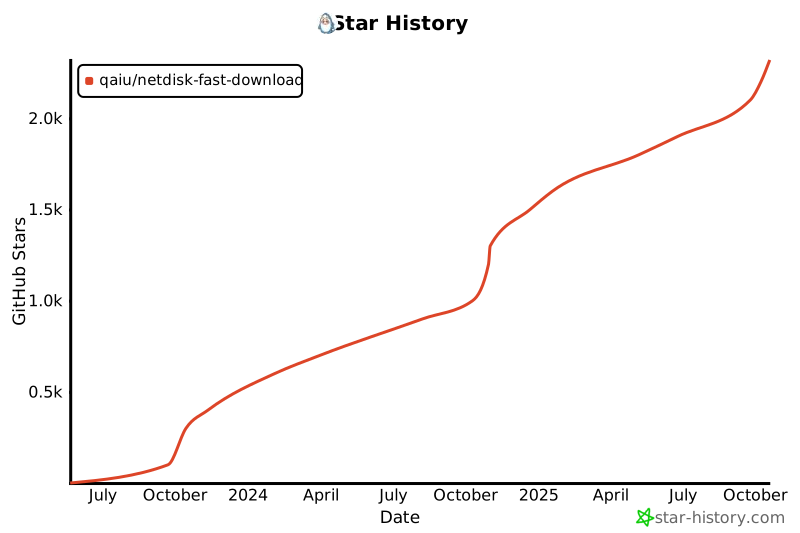](https://star-history.com/#qaiu/netdisk-fast-download&Date)
|
||
|
||
## **免责声明**
|
||
- 用户在使用本项目时,应自行承担风险,并确保其行为符合当地法律法规。开发者不对用户因使用本项目而导致的任何后果负责。
|
||
|
||
## 支持该项目
|
||
开源不易,用爱发电,本项目长期维护如果觉得有帮助, 可以请作者喝杯咖啡, 感谢支持
|
||
|
||
|
||
### 关于专属版
|
||
99元, 提供对小飞机,蓝奏优享大文件解析的支持, 提供天翼云盘,移动云盘,联通云盘的解析支持
|
||
199元, 包含部署服务和首页定制, 需提供宝塔环境
|
||
可以提供功能定制开发, 加v价格详谈:
|
||
<p>qq: 197575894</p>
|
||
<p>wechat: imcoding_</p>
|
||
|
||
<!--
|
||

|
||
|
||
[手机端支付宝打赏跳转链接](https://qr.alipay.com/fkx01882dnoxxtjenhlxt53)
|
||
-->
|
||
|
||
|
||
|
||
|